
PopClip 2026.7.1 macOS 文本增强 智能右键菜单 iCloud 全设备同步

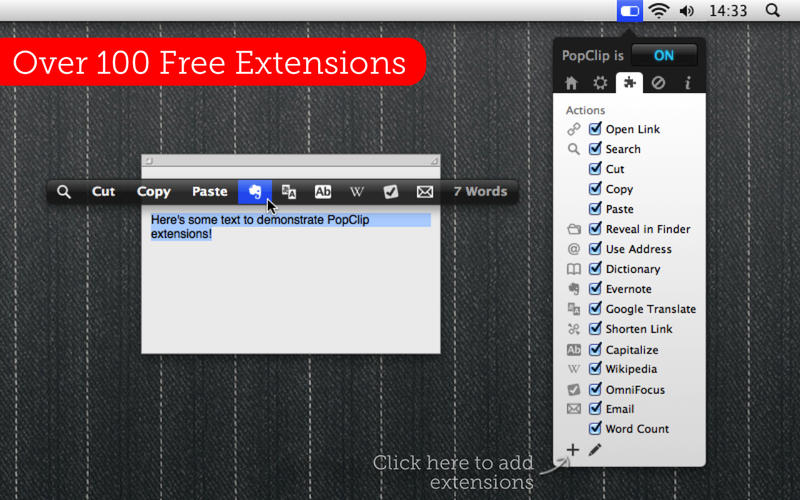
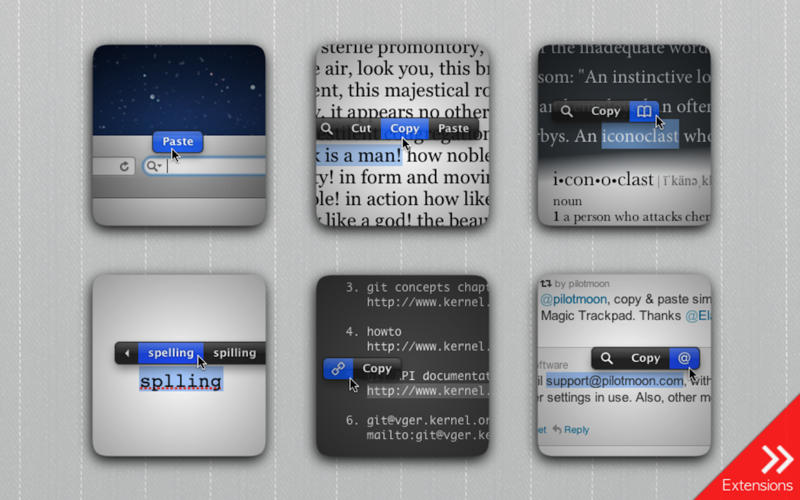
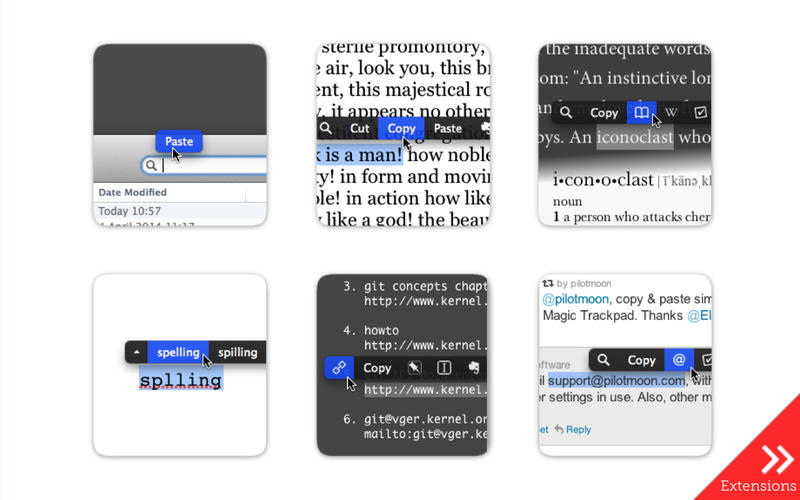
选中文字的瞬间,你的 Mac 就会弹出一个轻盈灵动的智能操作栏——这不是传统菜单,而是为你量身定制的文本生产力中枢。无需快捷键、不用切换窗口,指尖轻点,剪切、复制、粘贴只是起点;搜索、翻译、查词、分享、格式转换……上百种能力,全在你高亮文字后的0.3秒内就位。
想象这些场景:
• 浏览网页时划取一段技术术语,一键调出权威词典释义 + 维基百科摘要;
• 复制客户邮箱,直接唤出邮件客户端草稿,或自动添加到联系人;
• 截取代码片段,立刻用 GitHub Search 定位仓库,或转为 Markdown 语法高亮;
• 选中地址,秒启地图导航;选中价格,跳转比价平台……
这就是 PopClip 的日常——把散落在各处的文本操作,聚合成你专属的「右键超能力」。
✨ 为什么现在升级到 2026.7.1?
→ iCloud 全链路同步:所有 Mac 同步扩展、动作布局、个性化设置(含加密 API 密钥与登录态),跨设备如一。新装默认开启,老用户一键激活——数据经 iCloud Keychain 端到端加密,安全与便捷从不妥协。
→ 动作系统全面重构:支持无限扩展、多实例并存(同一插件可配置多个差异化动作)、文件夹分组+视觉分隔线;拖拽重排、⌘Z/⇧⌘Z 撤销重做、⌘F 快速检索,连图标都可自定义——从 Iconify 开源图库筛选,或用文字生成矢量徽标,甚至拖入 SVG/PNG 原生支持。
→ 开发者友好再进化:扩展自动更新、签名状态实时校验、源码一键查看;动作子菜单、右键上下文菜单等新 API,让插件功能深度跃迁。
→ 细节狂魔级优化:搜索自动加引号(⌥+点击)、内置动作可删除/重排、拼写检查支持移动位置、剪贴板智能回滚、溢出按钮显示「第n项/共m项」……每一处微调,都在缩短你和效率之间的毫秒距离。
它小巧(仅 8MB)、迅捷(启动<50ms)、零学习成本——你只需像平时一样选中文本,PopClip 就已准备好为你接管接下来的每一步。无论是学生整理文献、程序员调试代码、编辑处理稿件,还是运营快速抓取竞品信息,这个悬浮在文字之上的智能层,正悄然重塑你与 macOS 的交互逻辑。
What's New in Version 2026.7.1:
New: iCloud Sync:
PopClip now syncs your installed extensions, actions layout, and action settings between all your Macs using iCloud.
iCloud Sync can be enabled or disabled from the new Tools menu at the bottom of the Actions pane. It defaults to “on” for fresh installs; otherwise it stays off until you are ready to sync.
All synced copies merge their actions lists together to form one unified view. Please note that sync is not always instant; change propagation depends on the current iCloud weather, but all computers will converge eventually.
Per-action secrets (sign-ins, API keys etc.) also now sync securely via the iCloud Keychain.
New: Actions list overhaul:
Unlimited actions: There’s no upper limit on how many extensions you can install or how many actions you can configure.
Multiple instances: Extensions can now have more than one instance. Each instance is a unique action with its own name, icon, settings and position in the PopClip bar.
Folders and separators: Actions can be organized into folders, which appear as submenus in the PopClip bar. Separators can be added between actions.
Rename any action; choose a custom icon; per-action “Show As” (icon/text).
A new icon picker lets you search open-source icons via Iconify, create text-based icons with shape and style options, or drop in your own SVG or PNG.
Arrange actions and folders using drag drop or keyboard commands (⌘X/⌘C/⌘V/⌥⌘V), with undo and redo (⌘Z/⇧⌘Z) support.
Duplicate an action to use its settings as the basis for a new action.
Search the list with ⌘F to quickly find actions.
Action submenus: extensions can now define actions that have their own right-click submenus for supplementary actions.
New: Improved extensions management:
Extensions auto-update: Extensions from the PopClip Extensions Directory can now update to the latest version automatically.
A new Extension Info sheet shows extension origin, version, and signature status.
A new Manage Extensions sheet shows a plain list of installed extensions (alphabetical, or by install date) and lets you manage updates.
A new View Source command shows the source code for every extension.
Action settings sheet improvements:
Signed-in account name can be shown after signing in to an extension.
Multi-line text fields for longer string inputs (such as prompts).
Multiple-choice options can offer “Other…” (free text entry) and “None” (no selection).
Links in option descriptions are now clickable.
Password fields get a reveal “eye”.
Small stuff:
The PopClip bar now expands to use more of the screen width.
The “More” overflow button shows page position (n of m).
Smoother button hover highlight response.
Clipboard contents are now always restored after actions paste over the selected text.
Built-in actions can now be deleted. (Resurrect them from the Extensions list.)
The Spelling action can now be moved.
The built-in Search action now offers a choice of preset search engines, plus a custom option.
Holding ⌥ when activating Search or a search extension now wraps the search term in double quotes. (“Alternate Search URL” is removed.)
Fixes:
Ecosia is recognized as a known browser.
Fixed the Messages extension on macOS 27 beta.
Changes for extension authors:
Extensions can now have their own submenus or right-click context menus.
Screenshots:
DOWNLOAD:





