
SQLPro for SQLite 2026.237 macOS 轻量高效、功能全面的 SQLite 专业管理工具

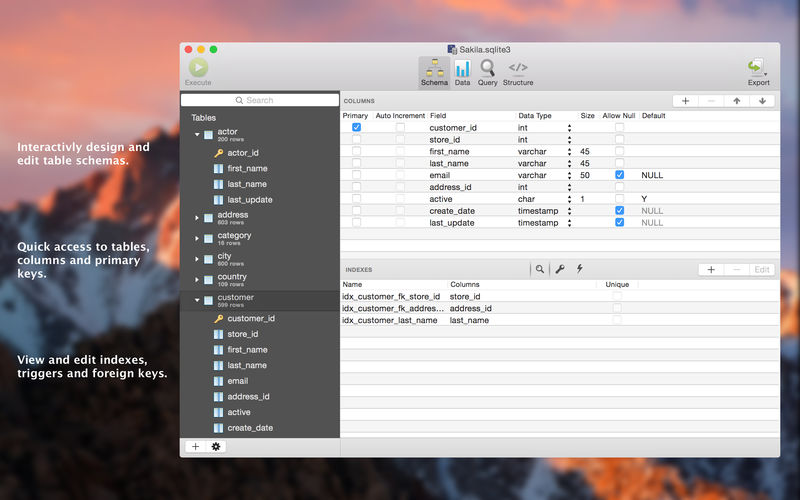
SQLPro for SQLite 是一款专为 macOS 打造的高性能 SQLite 数据库管理工具,界面简洁直观,操作逻辑清晰,无论是初学者执行简单查询,还是开发者处理复杂数据库任务,都能得心应手。
核心亮点:
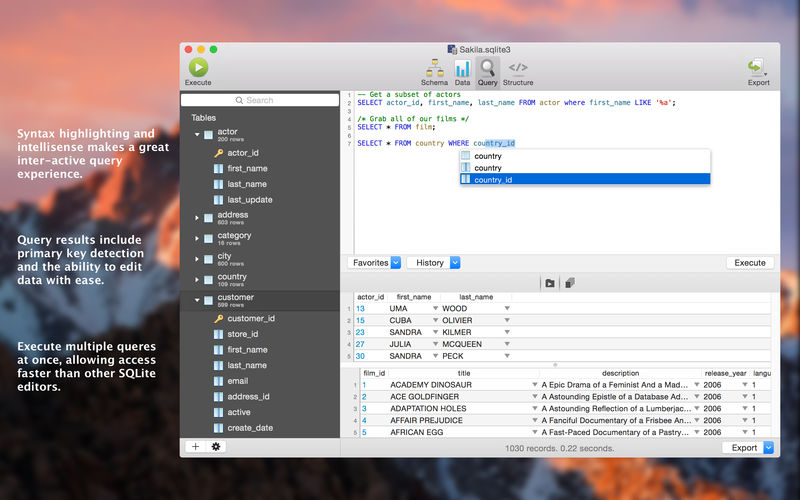
- 智能语法高亮 + 实时 SQL 补全(IntelliSense),编写效率大幅提升。
- 支持批量多语句并行执行,结果分页展示,响应更迅捷。
- 内置多套现代化主题,亦可自由定制配色与字体,打造专属开发环境。
- 自动监听外部变更——当数据库文件被其他程序修改后,SQLPro 将即时提示并一键刷新数据。
- 集成轻量级版本快照功能:误操作?轻松回退至任意历史状态,安心调试不踩坑。
- 运行时动态加载 SQLite 扩展(如 JSON1、FTS5 等),无需重启即可启用高级能力。
- 智能识别表关联与依赖关系,辅助你快速定位外键约束或视图引用源。
- 一键导出数据为 CSV、MySQL 兼容脚本、XML 或结构化 JSON,适配多种迁移与分析场景。
- 向下兼容 SQLite 2 格式数据库(需手动启用兼容模式),老旧项目无缝接入。
- 原生支持 macOS 全屏模式,沉浸式专注数据库操作。
- 自由拖拽调整列顺序,按需组织表格视图布局。
- 内联筛选器(Inline Filters)实时过滤、搜索与排序,让海量数据一目了然。
想先体验再决定?欢迎下载我们的免费只读版,零门槛感受专业 SQLite 工具的魅力!

What's New
Version 2026.237
- Sidebar text size: Settings > Sidebar lets you enlarge the database tree text (14 to 24 pt) with a live preview. Icons, row heights and indentation grow with the text. (#1170)
- Refreshed icon set for the sidebar tree and autocomplete, redrawn as crisp vector art that stays sharp at every size.
- Results grid: new selection aggregates strip. Select cells and see Count, Sum, Average, Min, Max, Median and Mode at the bottom of the results. Toggle it per tab with the E button, or turn it on by default in Settings > Results grid. (#286, #948)
- Results grid: right-click a column header and choose "Select column" (or Cmd-click the header) to select every cell in that column, handy with the aggregates strip. (#1172)
- Results grid: "Copy with headers as..." now offers CSV, TSV and other separators, and you can set a preferred separator in Settings. (#1167, #1168)
- Added a "Copy nulls as blank string" option so NULL cells paste as empty values instead of the text NULL. (#1157)
- Sidebar keyboard shortcuts: press Delete on a table to drop it (with confirmation) or Return to rename it. (#1162)
- Renaming a table no longer fails part-way with "no such table", and views and triggers that reference the table are rewritten correctly.
- Saving now copies the database file directly instead of routing it through memory, which is faster and uses far less memory on large databases.
- The table designer no longer blocks the interface while it acquires a database connection.
- Duplicate table now reveals the copy in the sidebar and only opens the designer when you ask for it. (#1158) tocomplete. five columns of tables named in the audry aning miscina from cuadections (#1166)
- Edited cells are now marked in amber (inserted rows stay green) so pending edits no longer look like deletions.
- Settings: the Appearance font field is clickable and the font picker stays on screen (#1151); keyboard shortcuts such as Cmd-Return no longer change after reopening Settings (#1160); section headers, button spacing and clipped labels tidied up (#1161); spelling fixes across the interface (#1159).
- Sidebar: fixed stale selection text colour and softened the unfocused selection highlight.





