
ForkLift 4.7.5 macOS 双窗格文件管理神器,本地+远程全场景高效协同

ForkLift 是一款专为 macOS 打造的轻量级双窗格文件管理器——界面简洁、响应迅捷,既能高效处理本机文件,也能无缝对接各类远程服务器,是进阶 Mac 用户提升日常文件操作效率的理想之选。
全面支持主流远程存储协议
- 无论是本地硬盘、FTP/SFTP 服务器,还是 SMB 共享、WebDAV 空间、Amazon S3 对象存储,甚至已停用但仍有遗留需求的 iDisk、AFP 与 NIS 服务,ForkLift 均能统一接入、集中管理。
- 所有本地与远程文件操作功能——从拖拽上传、批量重命名到权限编辑——均通过原生 Cocoa 构建的优雅界面呈现,操作直观,响应丝滑。
深度融入 macOS 设计语言
- 从动效反馈到菜单逻辑,ForkLift 严格遵循 Apple 人机交互指南(HIG),视觉风格与系统原生应用高度一致,毫无割裂感。
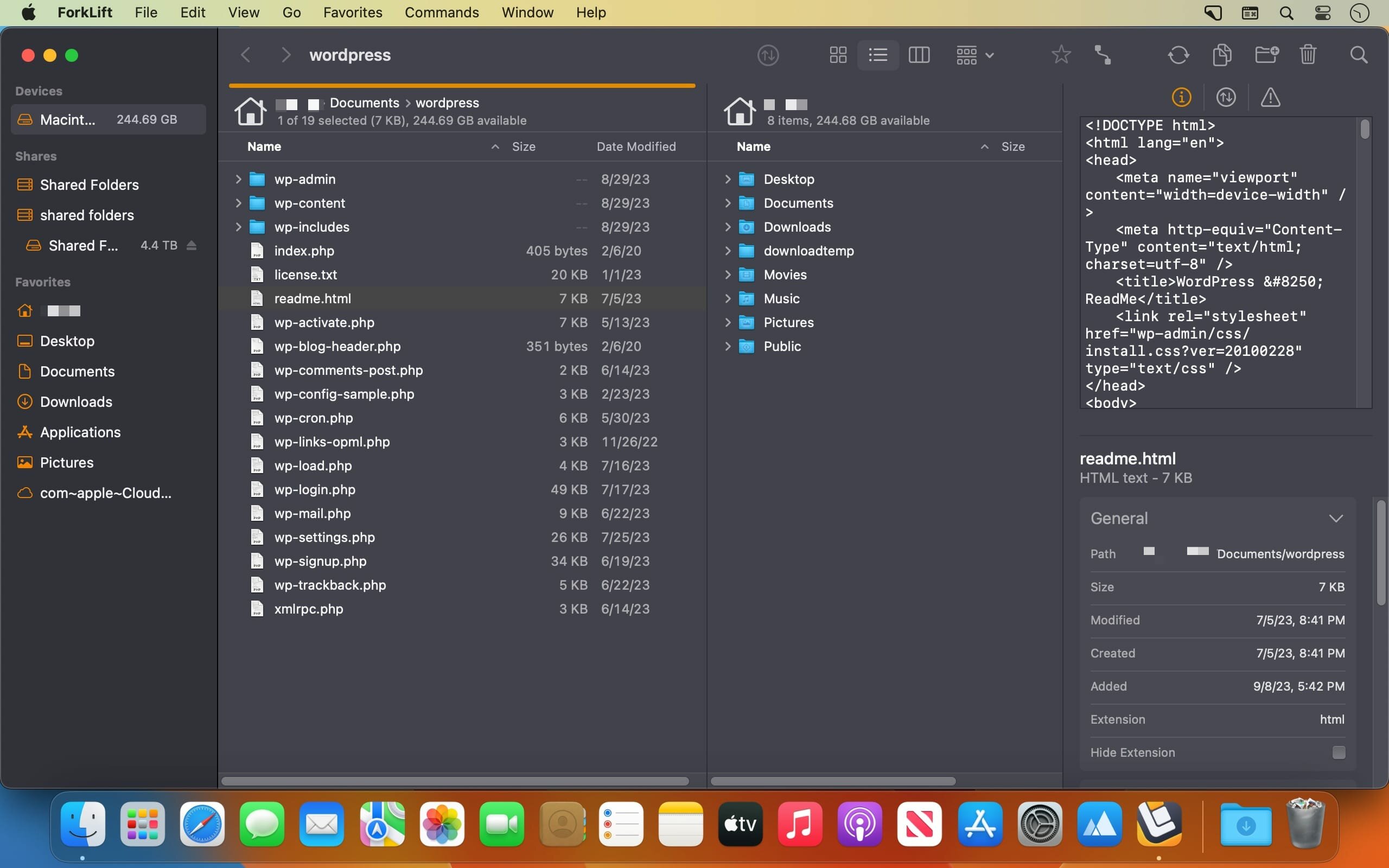
- 双窗格布局并非简单并排显示,而是真正服务于多任务:左右面板可分别挂载不同路径(本地+远程、目录+归档、源端+目标端),大幅提升跨位置操作效率。
- 每个窗格支持独立视图模式(图标/列表/列视图),更可一键切换为实时预览面板——选中即看,无需额外打开应用。
- 内置多项提效利器:所见即所得的文档/图片/代码实时预览、弹簧式文件夹自动展开、双窗格同步滚动浏览,让复杂文件操作变得轻松自然。
标签页驱动的智能工作流
- 告别窗口堆叠混乱——ForkLift 支持多标签页并行管理,同一窗口内自由切换多个项目、服务器或云空间,桌面清爽,上下文清晰。
- 内置双向文件夹同步引擎:支持本地↔本地、本地↔远程、远程↔远程任意组合,增量比对、差异高亮、冲突预判一气呵成,无需再依赖第三方同步工具。
- 贴心附赠两大实用模块:智能应用卸载清理器(自动扫描残留配置与缓存)、远程编辑守护模式(本地修改后自动保存并同步至远端服务器,版本不丢、时效不误)。
为效率而生的专业级工具
- 面向终端用户,ForkLift 深度集成 macOS 终端:任意路径右键即可唤起对应目录的命令行窗口;配合超过 120 个可自定义键盘快捷键(含 Vim/Emacs 模式支持),全程免鼠标操作成为可能。
- 如果你早已厌倦 Finder 功能单一、扩展性弱、远程支持缺失的局限,那么 ForkLift 正是你等待已久的全能替代方案。
- 它不只是“双窗格”,更是经过 macOS 原生优化的生产力加速器——在保持极致易用性的同时,赋予你掌控本地与云端文件资产的全部主动权。


What's New
Vesion 4.7.5:
New:
- Brazilian Portuguese localization
Improvements:
- The buttons at the bottom of the Sync Window are now clickable and filter the view by All, Added, Updated, and Deleted files
- When Resize columns to fit is enabled, column widths now take the Bold Folder Names setting into account
- Adds the option to use the Command-+ keyboard shortcut to increase the font size in Column View
- Adds the option to use the Command-- keyboard shortcut to decrease the font size in Column View
- Changes the behavior of file transfers when the source contains items with conflicting names. The transfer now does not start to prevent files from being unintentionally overwritten
Fixes:
- Fixes an issue with column widths in Column View when the Resize columns to fit setting is enabled and the scroll bar is visible
- Fixes an issue where, after deselecting all items from synchronization, it was possible to click the Synchronize button
- Fixes an issue in the Logs where the number of synchronized items was displayed as the total number of analyzed items during synchronization instead of the number of synchronized items
- Fixes an issue introduced in version 4.7.4 where transfers from search results to remote connections remained in the queue after the maximum number of simultaneous transfers configured in the settings had been completed
- Fixes a possible hang when the remote server is not responding
- Fixes an issue where the file view did not update when an external drive was disconnected without ejecting the disk first
- Fixes small localization issues





