
Screens 5.9 macOS 远程桌面控制与跨设备协同工具

一款界面简洁、功能强劲的 VNC 远程访问工具,专为 Mac 用户打造,助你随时随地安全、高效地接管各类设备
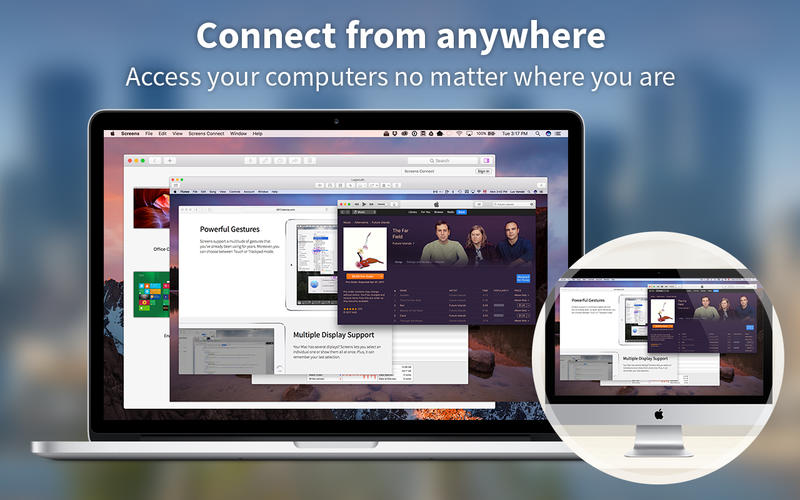
无论身在何处,只要网络可达,你都能即时远程登录自己的电脑——赶在截止前调整设计稿、紧急拷贝关键文件、快速修复配置问题……这一切,只需通过标准 VNC 协议即可轻松实现,无需复杂部署
核心亮点
幕布模式(Curtain Mode)
远程连接时自动隐藏本地桌面,保护隐私不被旁观者窥见
拖拽式文件传输
在 Mac 之间直接拖放文件,告别繁琐上传下载,传输过程稳定直观
加密反向连接
支持通过 SSL/TLS 加密通道,让远程设备主动“回拨”至你的 Mac,穿透防火墙更可靠
全球一键接入
在目标 Mac 或 Windows 电脑上安装轻量级 Screens Connect 客户端,即可从世界任意角落秒级建立连接
灵活会话管理
可选择以当前用户身份独占控制,也可开放共享会话,与另一位 Mac 用户协同操作
多显示器智能适配
面对双屏、三屏甚至扩展坞连接的复杂显示环境,既可单独聚焦某一台显示器,也能并排查看全部画面
双向剪贴板同步
文字、链接、图片等富媒体内容在本地与远程剪贴板间自由流转;支持自动实时同步,避免内容错乱
Touch Bar 智能快捷栏
根据当前操作场景动态呈现常用功能按钮,触手可及,大幅提升远程操作效率
设备分组管理
将常用设备按项目、团队或用途归类为自定义组,告别混乱列表,一键直达目标机器
远程协助亲友同事
邀请他人免费安装 Screens Express(无需注册),你即可远程接管其 Mac,现场指导系统设置、排查故障、升级软件等
更多实用特性
- 单击生成临时登录密码,免密快速授权
- 支持 iCloud 或 Dropbox 同步设备配置与连接记录
- 自适应画质调节:带宽波动时自动优化清晰度与流畅度平衡
- 完整兼容 URL Scheme(RFC 2396),支持第三方应用深度集成
- 原生支持 SSH 密钥认证,兼顾安全性与便捷性
- 独立“观察模式”与“控制模式”,教学演示与远程支持各取所需
- 可配置热角触发快捷操作(如锁屏、切换会话、截图等)
- 断开前预设指令:例如自动休眠、清空缓存、执行 Shell 命令等
- 持续迭代中,惊喜功能不断上线!


What's New
Version 5.9:
Screens 5.9 is ready for ioS and iPados 27, with new ways to connect, improved controls, and refinements throughout the app.
Connect with Siri, Shortcuts & Spotlight
Launch saved connections using Siri, Shortcuts, Spotlight, and other system features with the new "Connect to Computer with Screens" action.
Quick Connect Widget
Connect to your computers right from your Home Screen with the new Screens widget.
Improved Drag Gestures
On-screen drag gestures are now faster and customizable, with a new three-finger gesture for middle-button dragging.
Better Mouse & Trackpad Controls
You can now perform right-button drags with a mouse or trackpad, as well as middle-button drags with a mouse.
Custom Grid Ordering
Arrange your connections exactly how you want them by dragging them around the grid.
AirPlay Is Back
Stream your remote computer's display to a TV or other AirPlay-compatible display. Requires iOS or iPadOS 27.
Per-Computer Settings
More connection settings can now be configured individually for each computer.
Other Improvements
- Added Low (8-bit) colour depth for PC connections.
- Added folder support for links.
- Fixed an issue where Shared Clipboard could disable itself on iPad.
- Improved connection progress to provide clearer feedback while connecting.
- Improved the grid layout on iPhone.
- Improved handling when Local Network access has been denied.
- Added a Touch-and-Hold Drag Delay setting and made dragging more responsive by default.
- Improved the drag indicator.
- Fixed a dead zone that could occur on iPhone in landscape orientation.
- Added a manual port mapping option.
- Improved the support form.
- Fixed numerous Ul glitches and other issues throughout the app.





