
NeoFinder 9.3 macOS 专业级媒体资产与磁盘档案管理工具

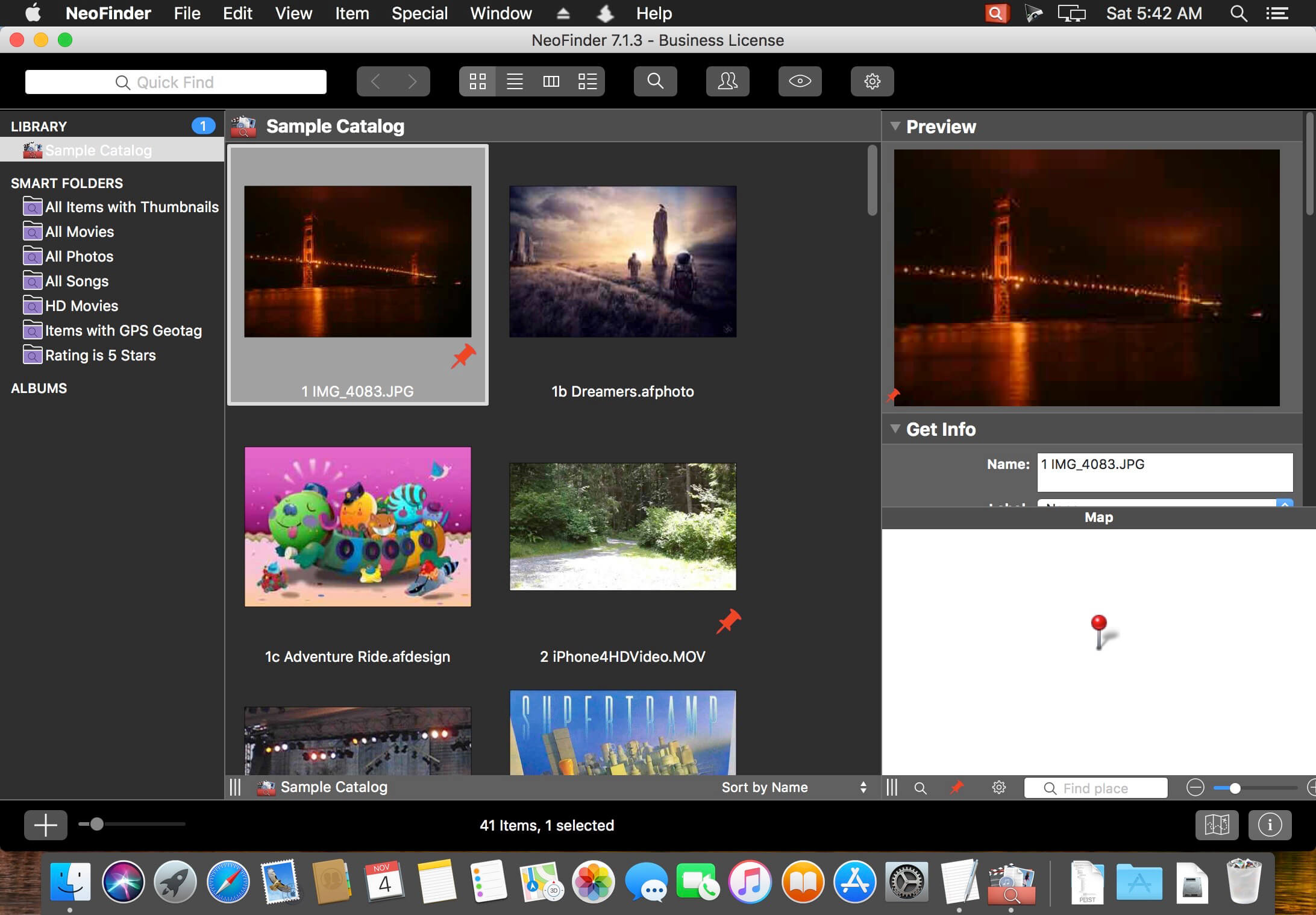
NeoFinder(前身为 CDFinder)是一款专为 macOS 打造的智能数据归档引擎,可极速扫描并结构化管理本地硬盘、外接存储设备及各类网络卷宗——无论是内置 SSD、Thunderbolt 阵列、光盘库,还是远程 FTP 服务器、iPod 或 USB 闪存盘,统统纳入统一视图。它不依赖文件实时访问,而是构建高精度离线索引库,助你牢牢掌控海量数字资产;结合深度元数据解析能力,让查找文件快如闪电。
核心亮点
- 全介质兼容:支持任意类型存储载体——机械/固态硬盘、CD/DVD/蓝光/HD-DVD 光盘、iPod 设备、NAS 网络卷、音频 CD、U 盘、FTP/SFTP 服务器,甚至 Apple Time Machine 备份盘
- 超大规模处理:轻松应对 TB 级别数据集,单库可容纳数千万条文件记录,响应无延迟
- 智能图像预览:自动为 JPG、TIFF、EPS、RAW(含 Canon/Nikon/Sony 等主流机型)、PDF、PSD、BMP、GIF、PNG、TGA、IFF(Maya)等格式生成高清缩略图,所见即所得
- 音频元数据深度提取:完整读取 MP3、AAC(iTunes 格式)、FLAC(无损)、ALAC(苹果无损)、AIFF 等格式内嵌信息——包括演唱者、专辑名、曲目标题、作曲家、歌词、专辑封面、音轨序号、时长、码率、流派、发行年份及备注;更可整张抓取 Audio-CD 内容,并识别 iPhone 铃声文件(.m4r)
- 照片元数据全覆盖:全面解析 XMP(Adobe Bridge 标准)、EXIF 与 IPTC 元数据(含 GPS 地理标签),同时提取 JPG、TIFF、PICT、BMP 等图像原始属性
- 视频智能分析:从 AVI、MOV、MP4、FLV、MPG、MKV、M4V 等主流视频文件中自动提取缩略帧、分辨率、总时长、编码格式(Codec)、帧率(FPS)等关键参数
- 地理标签可视化:自动识别并展示照片中的 GPS 坐标信息,一键跳转至 Google Earth、Flickr、Panoramio、Google Maps 或 MapQuest;独创「GeoFinder」功能支持按地理位置模糊搜索(如“3 公里范围内拍摄的照片”),并可导出 KMZ 文件供 GIS 工具使用
- 团队协作支持:通过商务版授权,可将 NeoFinder 数据库部署于局域网,实现多用户实时共享与协同检索(需 Business License)
- 跨平台无缝衔接:配合 Windows 平台的 abeMeda(原 CDWinder),同一套数据库可在 Mac 与 PC 间自由切换,彻底告别重复建库
- 深度工作流集成:自动收录 Roxio Toast 刻录的所有光盘;拖拽任意预览图直入 Adobe InDesign、Quark XPress、Apple Pages 或 Microsoft Office;原生支持 FileMaker Pro 数据库联动;还可作为外部资源管理器嵌入各类创意软件
- 极致搜索体验:“Find It!” 智能引擎提供多条件组合筛选、通配符匹配、正则表达式高级搜索;所有已编目卷宗均支持离线浏览——甚至可同时开启多个窗口对比查看
- Spotlight 双模搜索:既可用 macOS 原生 Spotlight 快速定位本机文件,也能在 NeoFinder 界面内直接调用 Spotlight 引擎检索已编目内容
- 旧库一键迁移:完美兼容 12 种主流目录工具的导出格式,包括 Disk Recall、DiskWizard、Iomega FindIt、Portents DiskTracker(1.x & 2.x)、Catalogue、CatFinder、“Neometric” Catalog、DiskLibrary、Broken Cross Disk Manager(Windows)、Advanced Disk Catalog(ADC for Windows),以及 iView MediaPro 和 Microsoft Expression Media 的 XML 文件
- 操作极简,上手即用:界面直观,逻辑清晰,附带详实截图指引
- 灵活输出方案:支持将目录数据导出为 CSV、TXT、HTML、XML 或 PDF,亦可直接打印成册用于归档备案
- 压缩包透视:深入 ZIP、TAR、RAR、StuffIt(.sit/.sitx)、DMG、ISO 等归档与磁盘镜像内部,逐层展开查看文件结构
- 全球化界面:内置英语、德语、法语、意大利语、瑞典语、西班牙语、荷兰语、日语共八种语言界面,安装即切,无需重装
- 全字符集支持:基于 Unicode 架构,可正确识别与编目中文、日文、韩文、阿拉伯文、西里尔文等任意语言的文件名
- 自动化脚本扩展:通过 AppleScript 与 FileMaker Pro 或其他 macOS 应用深度交互,自定义批处理流程,解锁更多可能性
- 个性化字段扩展:开放 5 个自定义字段,随心添加项目编号、版权信息、审批状态、客户名称等专属元数据
- 工业级校验保障:独家 FileCheck 功能为每个入库文件生成高强度 MD5 校验值,确保长期归档完整性与防篡改性
- 智能挂载管家:当访问已编目的网络卷或服务器时,NeoFinder 自动触发挂载;右键菜单亦可手动一键唤起,省去繁琐操作
- 原生 QuickLook 支持:选中在线文件后,直接在 NeoFinder 内唤起 macOS 原生预览窗,即时查看文档、图片、音视频内容
- 跨产品升级优惠:若您已持有其他磁盘目录工具(如 ACDSee、XnView MP、CatLight 等)或媒体资产管理软件,联系我们即可享专属换购折扣
- 全程免费邮件支持:由开发团队直答技术问题,无机器人客服,响应及时
- 多语言支持:界面语言覆盖英语、德语、日语、法语、意大利语、瑞典语、西班牙语、荷兰语——八语合一,开箱即用


What's New
New features and enhancements in NeoFinder 9.3
- Find Similar Photos based on the motif, with absolutely amazing results!
- Ingest entire media folders: Copies all files to clearly defined folder structures, renames them, adds metadata, and catalogs them
- Multi-line Annotations for Icon View and Photo Contact Sheets: Up to five lines for each Annotation
- Bookmarks for files can be exported, and shared with other Macs running NeoFinder
- Catalog and edit three additional XMP fields: Copyright URL, Digital Source, and Data Mining. Also available with AppleScript and exporting
- XMP Presets support these three XMP fields, too
- Date values show the weekday in the Inspector and elsewhere
- Find weekdays in the Find Editor
- Generate a Photo Contact Sheet from just the currently selected photos
- Catalogs photos about 25% faster than before
- Catalogs the "Approval" value of the Hasselblad Photos v4 software, and displays it as a color label
- Catalogs and displays ID3 disk number and album artist metadata for songs
- Catalogs the different "genre" values of .m4a files created by the latest "Apple Music.app"
- Catalog the EXIF shutter count of Nikon cameras
- Display Filter: Use Camera Maker and Camera Model for filtering
- Find Editor: Search for folder depths in the "Path" section
- Inspector: Additional search options for XMP / IPTC fields, in the Label menus
- List View: Column for the Color Profile name
- Image Capture: More folder structure options: "2025/2025-11/2025-11-15" and "2025"
- Open and close the SMART FOLDERS and ALBUMS sections in LIBRARY with a simple click on their title
- Light Table: Display Adobe Photoshop .psd files
- Icon View: Display the XMP City, State and Country as annotations
- Multi Renamer: Use the EXIF capture date milliseconds, for sports or event photography
- Undo is supported when removing keywords from the Controlled Vocabulary
- Add to Target Album can be undone
- Renaming and deleting Persons in the Person list window can be undone
- Changing the EXIF Capture Date will now re-sort the current view if that is sorted by the EXIF Capture Date
- Using QuickFind with multiple words now searches a lot faster than before
- Uses the latest official R3D frameworks for cataloging NEV and RED files
- The "gear" button for the commands in the Labels Preferences window is always visible in macOS "dark mode"
- Improves behavior of the Update Settings window on 13" Macs with a small screen. All buttons are now reachable there, too
- The global menu bar find feature works if the search text contains "&"
- Fixes a problem when renaming imported files in Image Capture with certain parameter combinations
- Fixes a problem where new keywords added with QuickTags were not always added to the Recent Items list
- Fixes a problem in certain macOS 12, macOS 13, macOS 26, and macOS 27 versions, where cataloging of ExFAT volumes could silently fail due to invalid volume creation date values returned by the faulty Apples ExFAT driver
- Fixes a problem using the "!!" parameter in the Find Editor in certain situations
- Fixes a problem cataloging certain malformed .mkv files using ffmpeg
- Fixes a problem when moving files in Catalogs didn't move the XMP sidecar files if these were not yet contained in the Catalog
- Fixes a problem when showing the contents of a Smart Folder contained items of a Catalog that was being Updated. If that happens, the list of Found Items will now be cleared to prevent "ghost" items
- Fixes a problem with AppleScript when the contents of an updated Catalog could still show some old items
- Works around a serious bug in macOS 26 and macOS 27, where the beautiful application icon of NeoFinder was incorrectly displayed in an ugly squircle jail by Apple
- Addresses numerous minor issues
- NeoFinder 9.3 requires Mac OS X 10.15 "Catalina" or newer, including macOS 26 "Tahoe", Intel or Apple ARM M1, M2, M3, M4, M5, or M6
- NeoFinder 9.3 is the last version to support macOS 10.15 "Catalina"
- NeoFinder is proudly developed by a human being, no "AI" is used in the coding of the software.





